Key takeaways - Network Access Control for Small Business in Melbourne
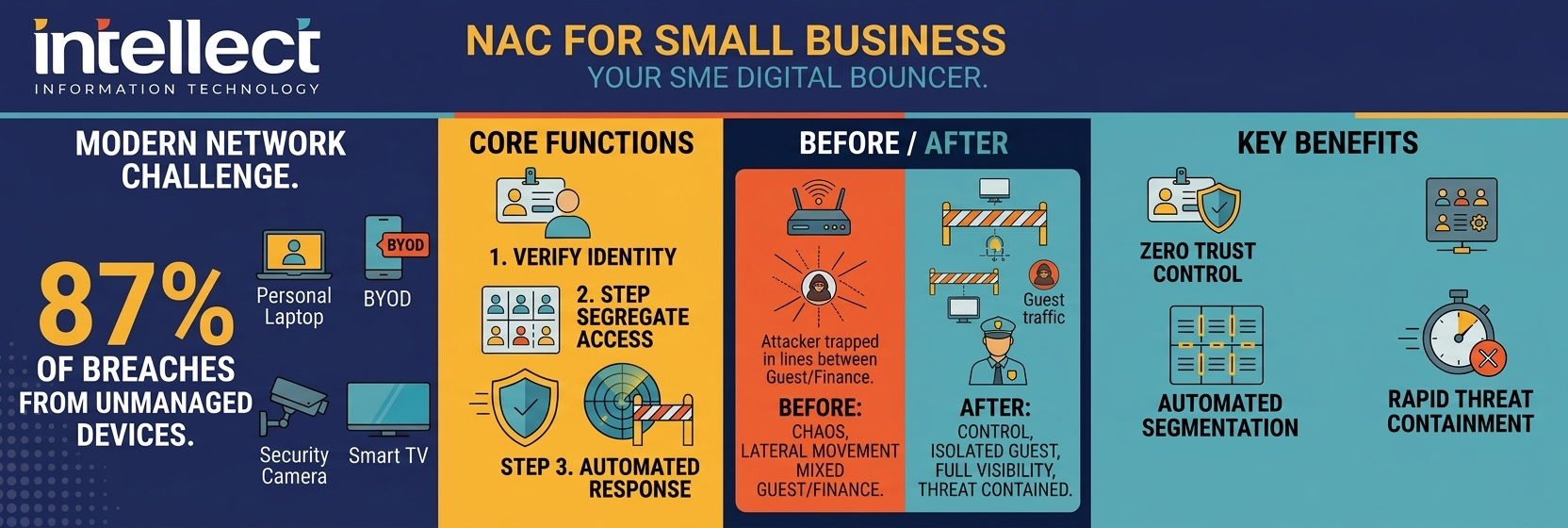
Network access control (NAC) decides which users and devices can connect to your business network and what they can access.
For Melbourne and Victorian SMEs, NAC is a practical way to put Zero Trust into action alongside existing firewalls, VPNs and identity tools.
NAC helps you separate guest Wi‑Fi, manage BYOD, automate segmentation and respond quickly to suspicious activity.
Modern cloud‑based NAC options make this achievable and affordable for small and medium businesses, not just large enterprises.
Intellect IT designs NAC solutions that fit your size, risk profile and budget as part of a broader cyber security roadmap.
Following on from our recent article on Zero Trust security for small business, this week we are looking at network access control for small business in Melbourne and across Victoria. If Zero Trust is the strategy, Network Access Control (NAC) is one of the most practical ways to actually put it into practice on your network.
For many Melbourne and Victorian organisations, the network now stretches well beyond the office. Staff connect from home, contractors join Wi‑Fi on site, and a mix of laptops, phones, printers, cameras and other smart devices all want access to the same resources. NAC brings order to that complexity by enforcing clear rules about who and what can connect, and what they are allowed to do once they are on the network.
What is network access control for small business?
Think of Network Access Control as the bouncer at the door of your business network. It decides who gets in, which devices are allowed to connect, and what parts of the network they can access once they are inside.
While physical access control decides who can open doors or enter server rooms, network access control decides who can "open the door" into your Wi‑Fi, applications and data.
Traditional network security often assumed that if you were already inside the network, you could be trusted. That assumption no longer holds. Today, your network might have:
staff connecting from home on personal laptops
contractors on their own devices
printers, smart TVs, CCTV cameras and IoT devices
guest Wi‑Fi users in the same building as your business systems
Any one of those could be a way in for an attacker.
NAC changes the model. Instead of "trust first, ask questions later", it is "prove you belong before you get access". Every device and every user is checked against a defined security policy before they are allowed onto the network, and they only get access to what they actually need.
For small businesses in Melbourne and Victoria, that "door" is often spread across offices, home networks and Wi‑Fi, which is why a consistent, policy‑based approach matters.
🔓
Without NAC
Any device can connect. Guest Wi‑Fi shares the same network as finance systems. No visibility of what is on your network. An attacker who gets in can move freely across everything.
🔒
With NAC
Only verified devices connect. Guest traffic is isolated. Every device is inventoried and monitored. Suspicious activity triggers automatic containment before damage spreads.
How does network access control support Zero Trust?
If you read our Zero Trust article, you will recognise the principle immediately: never trust, always verify.
Zero Trust is the overarching framework; NAC is one of the primary tools that enforces that principle at the network layer. Specifically, NAC focuses on the "who and what is connecting?" question by:
verifying user and device identity
checking whether the device meets your security policies (for example, patched, endpoint protection installed, disk encryption)
assigning the right level of access based on the user's role, device type and security posture
Together, Zero Trust and NAC form a layered defence. Zero Trust governs the strategy and policy; NAC makes sure the network itself acts on it, automatically and consistently. For Melbourne small businesses working towards cyber‑insurance questionnaires, Essential Eight uplift or ISO 27001 style controls, this alignment is increasingly important.
Zero Trust is the strategy. Network Access Control is how you actually enforce it at the network door.
— Intellect IT on Network Access Control for Small Business in Melbourne
What does NAC actually do day to day?
Here are some of the most practical ways network access control shows up in a small business environment. NAC works alongside your existing firewalls, VPNs and identity tools, providing another layer of control over which devices can connect in the first place.
In plain language
NAC decides which people and devices are allowed onto your network, checks they are safe enough, and then keeps them in the right "lane" so they can only reach what they actually need.
1. Stops unauthorised devices getting on your network
If a device is not recognised or does not meet your security requirements, it simply cannot connect, or it is placed into a restricted area (quarantine) until it can be checked. This is particularly valuable when:
staff bring personal devices to work
a contractor plugs in a laptop or network‑enabled device
someone connects an unmanaged device to an ethernet port in a meeting room
Instead of hoping nothing goes wrong, NAC gives you a predictable, policy‑driven response.
2. Separates guest Wi‑Fi from your business network
Guest Wi‑Fi is one of the most common starting points for NAC in small and medium businesses. NAC allows you to give visitors internet access without them ever being able to see your file servers, accounting systems or internal applications.
Guest traffic is completely isolated in its own network segment. Even if a visitor device is compromised, it cannot "see" your critical systems.
3. Manages BYOD (Bring Your Own Device)
Staff using personal phones or laptops for work is now normal, but it is also a real security challenge. NAC lets you define clear rules, such as:
a personal device can access email and collaboration tools
the same personal device cannot access the finance system or sensitive file shares
devices must meet minimum security settings (for example, PIN or biometric unlock, current OS patches, endpoint protection) before they are allowed on the network
That way, you support flexible working while still protecting critical systems.
4. Segments your network automatically
Network segmentation – dividing your network into separate zones so that a problem in one area cannot spread everywhere – is a long‑standing best practice. Many small businesses have not implemented it simply because it used to be complex to manage.
NAC automates segmentation based on device type, user role and security posture, so:
servers can sit in a protected network zone
staff devices occupy a different zone
guest and IoT devices live in tightly controlled segments
If something goes wrong in one area, it is much harder for an attacker to move sideways to reach more sensitive systems.
5. Gives you visibility of everything on your network
One of the most underrated benefits of NAC is simply knowing what is on your network. Many businesses are surprised to discover devices they did not know were connected.
Modern NAC tools provide a live inventory of:
all devices on wired and wireless networks
whether they are managed or unmanaged
what network resources they are trying to access
That visibility is fundamental for both day‑to‑day operations and incident response.
6. Responds automatically to threats
If a device starts behaving suspiciously – for example, repeatedly attempting to access systems it should not – NAC can automatically change its network access, up to and including full isolation.
This is particularly powerful when integrated with endpoint detection and response (EDR) tools and 24/7 security operations centre (SOC) monitoring. When something looks wrong, the system does not wait for a human; it acts immediately.
Rule of thumb: If you cannot see it, you cannot protect it. NAC gives you the visibility that every other control depends on.
✅ Does your business need NAC? Check any that apply:
Staff use personal devices for work
Guest Wi‑Fi shares the same network as business systems
Remote workers connect to internal systems
You have IoT devices (printers, cameras, smart devices)
Compliance or insurance requires cyber security controls
You cannot list every device currently on your network
0 of 6 checked
Is network access control only for big businesses?
This is probably the most common misconception when talking about network access control for small business. Historically, NAC was the domain of large enterprises with dedicated network teams and large budgets.
Small business myth
"NAC is overkill for SMEs." In reality, attackers actively target smaller organisations precisely because controls are often weaker.
That has changed. Cloud‑based NAC solutions now make it practical and affordable for small and medium businesses:
no need for expensive on‑premises hardware appliances
simpler deployment and management through cloud consoles
pricing models designed for small and medium environments
The reality is that small businesses are increasingly the target of cyber attacks, not despite their size, but because of it. Attackers know that smaller organisations often have weaker controls. NAC directly addresses one of the most common attack paths: an untrusted or compromised device getting onto a network and moving laterally to reach sensitive data or systems.
If your business has any of the following, NAC is worth a serious look:
staff using personal devices for work
guest Wi‑Fi in the same building as your business network
remote workers connecting to internal systems
a mix of managed and unmanaged devices (printers, cameras, smart devices, IoT)
compliance or insurance requirements around cyber security
For Melbourne and Victorian businesses, these patterns are now commonplace across professional services, construction, healthcare, education and other sectors.
🗳 Quick poll: What is your biggest NAC concern?
Cost and budget justification38%
Technical complexity27%
Disruption to daily operations18%
Not sure where to start17%
Which NAC solutions does Intellect IT work with?
Intellect IT assesses each client's environment before recommending a specific NAC solution, because the right fit depends on your existing infrastructure, network vendor and budget. The platforms most commonly used in client environments include:
Platform
Best fit
Key strengths
Fortinet FortiNAC
Clients already running Fortinet network and security platforms as part of a broader security fabric.
Deep Fabric integration, strong visibility, policy‑based control, automated responses as part of an integrated ecosystem.
Aruba ClearPass
Mixed‑vendor environments or sites where wireless networking is a primary concern.
Smaller businesses or distributed environments looking for a simpler entry point.
Minimal on‑site infrastructure, cloud management, single pane of glass across locations, designed for lean IT teams.
Intellect IT can help determine whether a cloud‑first NAC, a traditional on‑premises platform, or a hybrid approach is the right fit.
🔍 Which NAC approach suits your business?
Cloud‑first NAC is ideal for SMEs with distributed teams, limited on‑site IT, and a preference for OpEx over CapEx. Deployment is faster, management is simpler via cloud console, and scaling is straightforward. Best when your network is not tied to a single vendor's hardware ecosystem.
On‑premises NAC suits organisations with an established network vendor (e.g. Fortinet or Cisco), strong on‑site IT capability, and requirements for deep integration with existing security fabric. Higher initial investment but maximum control and customisation for complex environments.
Hybrid NAC combines cloud management with on‑premises enforcement points, giving you the simplicity of cloud with the depth of on‑site control. Ideal for growing businesses that want cloud convenience today but need to preserve integration options as their infrastructure matures.
How NAC fits into your cyber security roadmap
For many Melbourne and Victorian organisations, NAC is not a standalone project. It often comes in alongside:
Wi‑Fi or switching upgrades
office moves or new site fit‑outs
broader cyber security uplift driven by insurance, client demands or regulatory guidance
1
Assess and discover
Understand what is on your network today, how staff work, and where the gaps and risks are.
2
Design practical policies
Define who and what should be allowed on, and the right level of access for each role and device type.
3
Implement and refine
Roll NAC in phases, monitor behaviour, and refine policies so they stay effective without getting in the way of work.
Intellect IT works with small and medium businesses across Melbourne to design network access control solutions that match their size, risk profile and budget, rather than forcing an enterprise design into a smaller environment.
What is network access control for small business in Melbourne? (Q&A)
What is network access control for small business in Melbourne?
Network access control for small business in Melbourne is the set of tools and policies that decide which users and devices can connect to your network, check that they meet your security requirements, and limit what they can access once they are connected. It helps stop unauthorised or insecure devices reaching sensitive systems.
Is NAC only for large enterprises?
No. Modern, cloud‑based NAC solutions are designed specifically to be achievable for small and medium businesses, both in cost and complexity. They remove much of the hardware and day‑to‑day management burden that made traditional NAC difficult for SMEs.
NAC helps demonstrate that you control which devices can access your network, can segment sensitive systems, and can respond quickly if something suspicious appears. These are controls that insurers and regulators increasingly expect to see in place.
When should a small business in Melbourne consider network access control?
Common triggers include Wi‑Fi upgrades, office moves, new compliance or insurance requirements, or incidents that highlight gaps in visibility and control. If you are already investing in cyber security uplift, network access control is a logical next step after strengthening identity, endpoints and perimeter controls.
How is network access control different from door access control systems?
Door access systems control who can physically enter your building or rooms. Network access control manages which users and devices can connect to your business network and systems, and what they are allowed to access once connected.
Ready to tighten who and what reaches your network?
If you would like to explore network access control for your small business in Melbourne or regional Victoria, contact Intellect IT on 1300 799 165 or reach out via our Cyber Security services page.
Roy Solterbeck is a Director and Co-founder of Intellect IT. Since co-founding the company in 2003, Roy has established himself as a prominent voice in the Melbourne technology sector.
With over 25 years of experience in technical architecture and IT strategy, he has guided hundreds of organisations through major technological shifts - from the move to virtualisation and cloud computing to the modern challenges of AI and quantum readiness.
Roy is a firm believer in "accumulated knowledge" and "vendor-agnostic" solutions. His leadership ensures that Intellect IT provides impartial, expert-led guidance that prioritises the client’s long-term resilience over short-term trends. Under his direction, Intellect IT has maintained a 4.9-star Google rating and a near-perfect CSAT score, reflecting his commitment to technical excellence and client trust.
Protect your business from email impersonation, phishing and spoofing with DKIM and DMARC email security. Intellect IT helps Australian organisations configure, monitor and enforce email authentication.
Cloud backup gaps can leave Microsoft 365, cloud apps and critical data exposed. Learn what native tools miss and how to prove your business can recover.
Cloud backup gaps can leave Microsoft 365, cloud apps and critical data exposed. Learn what native tools miss and how to prove your business can recover.
Build a cyber resilience strategy that protects critical data, supports ransomware recovery and strengthens business continuity. Speak with Intellect IT.
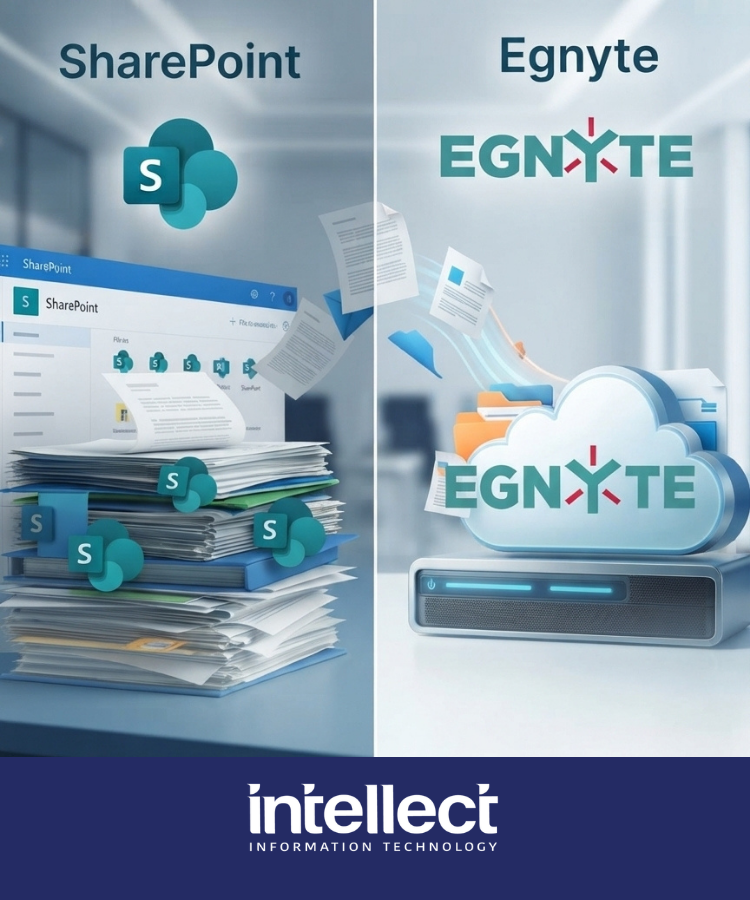
Comparing Egnyte vs SharePoint file management? See why Melbourne engineering and hybrid businesses choose Egnyte for file governance and hybrid access.