Skip to content

Egnyte vs SharePoint File Management: When SharePoint Stops Being Enough

Comparing Egnyte vs SharePoint file management? See why Melbourne engineering and hybrid businesses choose Egnyte for file governance and hybrid access.  

At a glance

Core takeaway – Egnyte vs SharePoint file management
SharePoint is a strong Microsoft 365 collaboration platform, but Egnyte may be a better fit where files are large, sensitive, spread across locations or still depend on local infrastructure.
Key subject
Hybrid file access, SharePoint governance, external sharing, sensitive data controls and ransomware recovery.
Target audience
Melbourne engineering, manufacturing, construction and project-based businesses using Microsoft 365 with complex file-management requirements.
Recommended approach
Assess how staff access, share and protect files before deciding whether SharePoint, Egnyte or a combined Microsoft 365 and Egnyte model is the right fit.
Egnyte vs SharePoint File Management
Need clearer control over business files? Review whether SharePoint, Egnyte or a combined approach best supports your team.

QUICK ANSWER

Egnyte vs SharePoint file management: Which is right for your business?

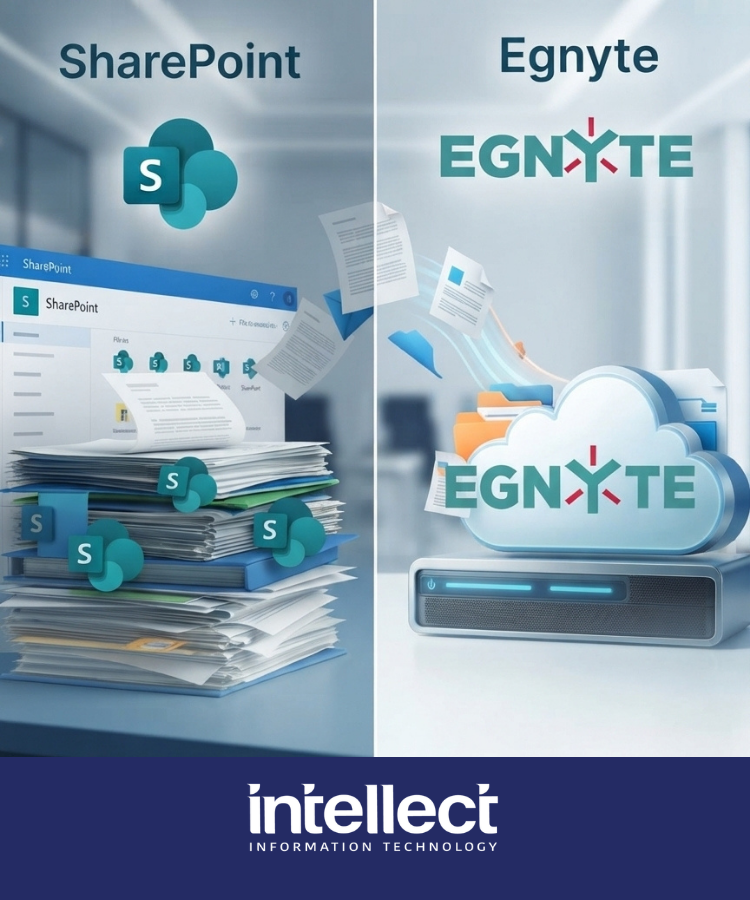
When comparing Egnyte vs SharePoint file management, there is no automatic winner. SharePoint is a strong option for businesses that work primarily in Microsoft 365, have a cloud-first file environment and can actively manage document libraries, permissions and governance.

Egnyte is often a better fit when a business needs hybrid file access, works with large or sensitive files, supports staff across offices and sites, or needs stronger control over external sharing and file activity. For many Melbourne businesses, the right answer is not Egnyte instead of Microsoft 365; it is Microsoft 365 for everyday collaboration, with Egnyte providing more specialised file management and governance.

WHAT TO KNOW FIRST
What should you know about Egnyte vs SharePoint file management?

Key takeaways

  • SharePoint is not the wrong platform – SharePoint works well for businesses that are cloud-first, mainly work in Microsoft 365 and have the internal capability to manage document libraries, permissions and governance properly.
  • Hybrid access is an operational requirement – For engineering, manufacturing, construction and project-based teams, cloud-only access is not always practical. Reliable local access can still matter when staff work across offices, warehouses, workshops and project sites.
  • File complexity should guide the decision – Egnyte becomes more relevant when files are large, sensitive, spread across locations, shared with external parties or still need to work with local servers and infrastructure.
  • Microsoft 365 and Egnyte can work together – The best outcome is often not Egnyte instead of Microsoft 365. Businesses can continue using Teams, Outlook and Microsoft Office while using Egnyte for more controlled access to important files, external sharing, hybrid storage and data governance.

Why Egnyte vs SharePoint file management matters for growing businesses

File management becomes a business issue when staff cannot reliably find, access, share or protect the information they need to do their jobs. For growing organisations, the problem is rarely one platform in isolation. It is the gradual build-up of files across SharePoint, Teams, OneDrive, local servers and individual devices. Without a clear operating model, permissions become difficult to review, duplicate files multiply, external sharing creates risk and important data remains in locations that IT cannot easily govern. Comparing Egnyte vs SharePoint file management gives businesses a structured way to decide whether SharePoint is still the right fit, whether Egnyte can fill specific gaps, or whether both platforms should work together.

Customer perspective

“Egnyte has delivered real value to Kincrome. It’s simplified how we manage files across the business, made access and collaboration smoother, and given us the security and flexibility to support a growing, distributed workforce.”

Aaron IT Manager, Kincrome Australia

That experience reflects why businesses look beyond a default cloud-storage setup when file access, governance and operational requirements become more complex.

Four file-management decision areas

A practical comparison between Egnyte and SharePoint should focus on four operational areas:
  • File access and collaboration: Assess how staff find, open, edit and share files across offices, project sites, home offices and external parties.
  • Hybrid storage and performance: Review whether important files need to remain available on local infrastructure because of file size, specialist applications, performance requirements or unreliable connectivity.
  • Data governance and permissions: Identify where sensitive files sit, who can access them, how sharing is controlled and whether old permissions are being reviewed.
  • Security and recovery: Confirm how the business detects suspicious file activity, limits ransomware damage and restores affected files when an incident occurs.

How to assess Egnyte vs SharePoint file management

A sound decision should start with the file environment your people actually use—not which licences are already included in your Microsoft 365 subscription.
  • Step 01
    Map File Locations
  • Step 02
    Review Access
  • Step 03
    Assess Workflows
  • Step 04
    Identify Risk
  • Step 05
    Design the Right Model
  • Map file locations: Identify data held in SharePoint, Teams, OneDrive, local servers, staff devices and external collaboration platforms.
  • Review access: Check how staff, contractors, clients and suppliers receive access, and whether permissions reflect current business roles.
  • Assess workflows: Look at file types, file sizes, staff locations, offline requirements, external sharing and the systems that depend on those files.
  • Identify risk: Find duplicated data, unmanaged sharing, sensitive-content exposure, recovery gaps and locations where staff are relying on workarounds.
  • Design the right model: Decide whether a cleaner SharePoint design, Egnyte, hybrid storage or a combined Microsoft 365 and Egnyte model will solve the actual problem.

What a file-management review should cover

The assessment should cover the technical and operational areas that shape how securely and reliably your business can work with files:
  • SharePoint, Teams and OneDrive: Reviewing document libraries, synchronisation, site structure, Teams file locations and existing sharing practices.
  • Local servers and hybrid storage: Identifying data that must remain local because of application dependencies, large file sizes, performance needs or site connectivity.
  • External sharing: Reviewing contractor, client and supplier access, expiry settings, permission reviews and secure collaboration workflows.
  • Sensitive content and governance: Locating customer records, financial information, contracts, HR documentation and other data requiring stronger controls.
  • Ransomware resilience: Confirming file monitoring, recovery options, backup coverage and incident-response responsibilities.
  • Identity and access management: Reviewing MFA, least-privilege access, user lifecycle processes and administration controls.
  • Microsoft 365 configuration: Assessing whether SharePoint, Teams, OneDrive and Microsoft Purview are configured to support the business’s actual governance needs.
Egnyte Smart Cache is designed to support a hybrid file environment. It can provide local access to selected content that has been configured for synchronisation when cloud connectivity is interrupted. Users can continue working on that synchronised content, with changes synchronised once connectivity is restored. Microsoft recommends syncing no more than 300,000 items for optimum OneDrive sync performance. That does not mean every larger environment will fail, but it remains an important planning consideration when SharePoint libraries and synchronised folders become large. Read Microsoft’s OneDrive and SharePoint limitations guidance. Egnyte Secure & Govern can help organisations identify sensitive content and apply controls across connected repositories. Microsoft Purview can also provide classification, sensitivity labels and information protection within Microsoft 365, but the practical outcome depends on the business having the right licensing, configuration and ongoing management. File recovery also needs to be considered alongside prevention. Egnyte offers ransomware detection using behavioural and signature-based indicators, plus snapshot-based recovery options that can help authorised administrators restore affected content, depending on the organisation’s plan and configuration. Learn more about Egnyte ransomware detection and recovery.

Business impact: from file friction to control

The goal is not to add another platform for the sake of it. The goal is to give staff simple, dependable access to the information they need while giving IT clearer control over where that information lives and who can access it. A well-designed file-management model can deliver:
  • Less duplication and fewer workarounds: Staff spend less time searching for files, saving local copies or asking IT which version is current.
  • Better security and governance: IT gains clearer oversight of sensitive data, external sharing and access permissions.
  • More reliable collaboration: Teams can work across offices, sites and external parties without creating unnecessary copies or unmanaged access.
  • Stronger recovery readiness: The business has a clearer plan for identifying, containing and recovering from file-based incidents.

Common file-management pitfalls

The most common mistake is assuming that a Microsoft 365 licence automatically resolves every file-management requirement. It does not. SharePoint still needs structure, permissions need ongoing review and governance controls need to be configured around the way the business actually works. Other common issues include allowing external access to continue after projects close, using local copies as a permanent workaround for poor file access, trying to migrate every file into the cloud without considering operational dependencies, and treating ransomware protection as a backup issue rather than a file-access issue.

SharePoint Only vs Microsoft 365 and Egnyte

Area SharePoint Only Microsoft 365 and Egnyte
Best fit Cloud-first teams with straightforward Microsoft 365 document workflows Businesses with hybrid storage, large files, complex sharing or stronger file-governance needs
File access Cloud collaboration through SharePoint, Teams and OneDrive Microsoft 365 collaboration with more specialised file access across cloud and local environments
Governance Requires strong SharePoint architecture and Microsoft Purview configuration Adds file-focused governance and visibility alongside Microsoft 365 controls
Operational focus Best where cloud connectivity and standard Office files meet day-to-day needs Best where operational teams need access to project files, local data or external collaboration

SharePoint is more than file storage

SharePoint is not only a place to store documents. It can also support intranet pages, department hubs, news, knowledge content, document libraries, metadata and Microsoft 365 workflows. That makes it a strong choice when a business wants its collaboration and internal communications centred in the Microsoft ecosystem.

Egnyte becomes more relevant when the core problem is not building an intranet, but managing business-critical files across cloud platforms, local infrastructure, project sites and external parties. In many environments, the two platforms can have distinct roles rather than competing for the same job.
OUR DELIVERY MODEL

How Intellect IT improves file management

1

Phase 1 – Understand your file environment

  • Map file locations: We identify where business-critical files are stored across SharePoint, Teams, OneDrive, local servers, staff devices and external platforms.
  • Understand how teams work: We review file types, project workflows, office and site access requirements, large-file usage and external collaboration needs.
  • Identify operational friction: We look for duplicate files, unreliable access, uncontrolled local copies and workarounds that make file management harder for staff and IT.
2

Phase 2 – Review access, governance and risk

  • Review permissions: We assess who can access sensitive folders and files, including employees, contractors, suppliers, former staff and external project contacts.
  • Assess data governance: We identify sensitive information, external-sharing practices, ownership gaps and whether existing Microsoft 365 controls are configured for the way your business operates.
  • Check resilience: We review file recovery readiness, ransomware exposure, backup coverage and the controls that help limit the impact of a compromised account.
3

Phase 3 – Design the right file-management model

  • Recommend the right approach: We determine whether a better SharePoint structure, Egnyte, hybrid storage or a combined Microsoft 365 and Egnyte model is the best fit.
  • Define the target state: We set out the recommended file structure, access model, governance controls, recovery requirements and responsibilities for ongoing administration.
  • Build a practical roadmap: We prioritise the work around business risk, operational impact, user adoption and the capabilities of your internal team.
4

Phase 4 – Implement, support and improve

  • Implement the solution: We can help structure SharePoint, deploy Egnyte, migrate files, configure hybrid access and establish secure external-sharing workflows.
  • Strengthen security: We configure appropriate permissions, identity controls, file-governance settings, backup and recovery processes to protect important business data.
  • Support adoption and ongoing governance: We help staff transition to the new way of working and review the environment as business requirements, projects and cyber risks change.

The goal is not simply to move files. It is to create a file-management environment that is dependable for staff, controlled by IT and ready to support secure business growth.

Interactive check

File Management Readiness Check

Answer four quick questions to see whether your current file-management setup may need a closer review.

Are your business-critical files stored in clearly defined locations rather than across servers, SharePoint, Teams, OneDrive and staff devices?

Are permissions for contractors, suppliers and former staff reviewed and removed when projects or employment end?

Can teams working from sites, warehouses or remote locations reliably access important files without creating local duplicates?

Could IT identify affected files and restore clean versions if a compromised account encrypted or deleted shared data?

Your current file-management position

Answer all four questions to see your directional result.

This is a quick directional check, not a detailed technical assessment.

Decision support

Which file-management approach fits your business?

Choose the scenario that sounds most like your current environment.

SharePoint may be the right fit if your business is cloud-first, works mainly in Microsoft 365, has straightforward Office-document workflows and actively manages sites, permissions and Microsoft Purview controls.

Fast answers

Common Egnyte and SharePoint questions

Tap a question for a short, practical answer.

Is Egnyte better than SharePoint?
Not automatically. SharePoint works well in many Microsoft 365 environments. Egnyte is more relevant where a business needs hybrid access, large-file support, detailed file governance or simpler management of external sharing.
Can Egnyte work with Microsoft Teams and Microsoft 365?
Yes. Egnyte can integrate with Microsoft Teams so users can access and collaborate on Egnyte-managed files while continuing to use familiar Microsoft 365 tools.
Does Egnyte replace Microsoft 365?
Usually, no. Many businesses continue using Microsoft 365 for Outlook, Teams, Word, Excel and day-to-day productivity, while using Egnyte for more specialised file access, governance and hybrid storage.

How Intellect IT can help

At Intellect IT, we help Melbourne businesses make practical decisions about file management without forcing a one-size-fits-all platform choice.

We assess where files are stored, how staff access and share them, which information needs stronger protection, and where the current Microsoft 365, SharePoint or server environment is creating friction. From there, we can determine whether a better SharePoint structure, Egnyte, or a combined approach is the right fit.

Our director-led managed IT services can support the wider work around file access, Microsoft 365, cyber security, backup, recovery, cloud infrastructure and ongoing governance.

The result is a file-management environment that is easier for staff to use, easier for IT to control and better prepared for growth, external collaboration and cyber risk.

Talk to Intellect IT about Egnyte vs SharePoint file management.

QUESTIONS, ANSWERED

Frequently asked questions

Comparing Egnyte vs SharePoint file management? These are the practical questions Melbourne businesses ask when reviewing file access, governance and hybrid storage.
Egnyte is not automatically better than SharePoint. SharePoint is a strong choice for businesses that work mainly in Microsoft 365, have a cloud-first file environment and can actively manage document libraries, permissions and governance. Egnyte is often a better fit when files are large, sensitive, shared externally, spread across multiple locations or need to work with local infrastructure.
Yes. Many businesses continue using Microsoft 365 for Outlook, Teams, Word, Excel and day-to-day collaboration, while using Egnyte for project folders, external sharing, sensitive files and hybrid storage. The goal is not to duplicate platforms; it is to use the right platform for each part of the file environment.
Yes. Egnyte can integrate with Microsoft Teams so users can access, edit and share Egnyte-managed files within Teams channels and chats. This helps staff keep using familiar Microsoft 365 collaboration tools while important files remain managed in Egnyte.
Egnyte is worth considering for businesses that work with large drawings, designs, video, technical documents and project folders—particularly when staff work across offices, workshops, warehouses or project sites. Its hybrid options can support locally synchronised content where cloud connectivity is interrupted, subject to configuration and selected folders.
Usually, no. Microsoft 365 remains the primary productivity platform for many businesses. Egnyte can complement Microsoft 365 by providing more specialised file management, hybrid access, external sharing, content governance and file-focused security controls.
SharePoint may still be the right fit if your file environment is cloud-first, relatively straightforward and actively governed. If staff save duplicate local copies, files are spread across servers and Microsoft 365, permissions are unclear, or site teams need dependable local access, it is worth reviewing the environment. Talk to Intellect IT about Egnyte vs SharePoint file management.

Ready when you are

Ready to experience
IT that just works?

Talk to an IntellectIT specialist. No obligation, no sales pitch, just honest advice for your business.