




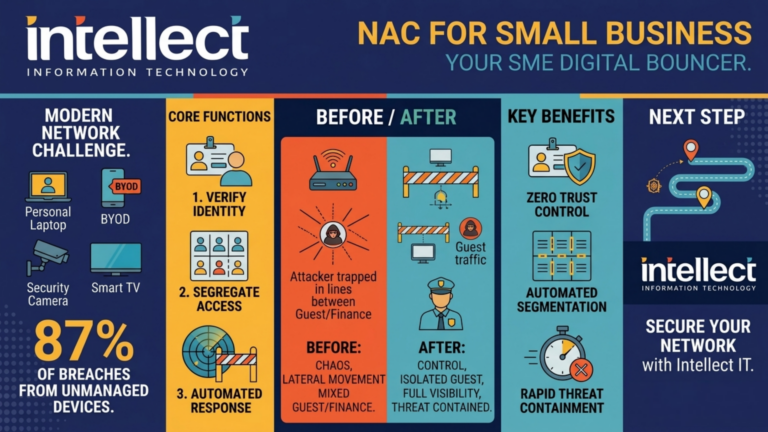
Network Access Control for Small Business in Melbourne
Discover how network access control for small business in Melbourne helps you secure devices, manage guest Wi‑Fi and support Zero Trust across Victoria.

When we talk with small businesses about cybersecurity, the conversation often focuses on passwords, MFA, phishing, and cloud security. These are all critical, and frameworks like Zero Trust and Network Access Control (NAC) go a long way to reducing modern cyber risk.
But there's one area that is still commonly overlooked.
What happens when someone can physically plug a device into your network?
In this article, we'll explain why Zero Trust physical network access is just as important as digital access controls, and how Zero Trust and NAC work together to prevent a single cable from becoming a serious security incident.
Zero Trust physical network access takes the "never trust, always verify" philosophy and applies it right down to the physical layer of your network. Instead of assuming that anything plugged into a wall jack is trustworthy, the network treats those ports like any other untrusted entry point—every device and every user must be identified, verified, and checked against policy before access is granted.
In more mature environments this extends beyond the wall socket itself. Physical entry to critical areas (such as server rooms or network cupboards) is tied to identity-based access, facilities are segmented into separate secure zones, and the hardware layer is monitored for rogue devices or unauthorised Wi-Fi access points as soon as they are connected. For small businesses, you don't need biometric scanners or a data-centre budget, but you do need NAC and clear rules so that a wall socket behaves like a Zero Trust control point, not an open doorway.
Traditionally, business networks were built on a simple assumption:
If you're inside the office and plugged into the network, you must be trusted.
— Traditional Network Security Model
That model worked, until it didn't.
Today, offices are more open than ever. Contractors, cleaners, visitors, hybrid staff, and shared spaces are all normal. Many businesses still have live network ports in meeting rooms, warehouses, or reception areas.
Without the right controls, any device plugged into those ports may gain immediate access to the internal network.
If Network Access Control isn't configured, physically connecting to the network can mean:
An unauthorised device could access sensitive databases, customer records, or financial systems within seconds of connection.
Network scanning tools can map your entire infrastructure, identifying vulnerable systems and potential attack vectors.
Shared resources often have weak access controls, making them easy targets for data exfiltration or lateral movement.
A single compromised device on the network can spread ransomware to all connected systems within minutes.
Physical network access circumvents cloud security layers, email filtering, and many Zero Trust policies.
This is especially dangerous because physical access often bypasses traditional security assumptions. Firewalls and cloud controls protect how traffic enters your network, not what walks straight in through an Ethernet cable.
In other words, MFA won't help if the attacker never needs to sign in, email security won't matter if malware enters from a USB network adapter, and Zero Trust policies can't apply if the device is never validated.
That's why Zero Trust physical network access is so critical: Trust shouldn't be granted just because a cable is plugged in.
Network Access Control flips this model on its head.
Instead of trusting a device because it's connected, NAC asks:
What device is this? Is it known and managed?
Who does it belong to? Does the user have valid credentials?
Does it meet our security standards and compliance requirements?
| Scenario | Without NAC | With NAC |
|---|---|---|
| Unknown device connects | Full network access granted | Blocked or isolated |
| Contractor personal laptop | Can scan entire network | Guest network only |
| Compromised device | Malware spreads freely | Containment at port level |
| Non-compliant device | No visibility | Redirected for remediation |
| Rogue Wi-Fi access point | May go undetected | Detected and blocked |
With NAC in place, a device plugged into the network might be:
This is the critical link between physical access and modern security. A cable alone no longer grants trust.
If you want to read more about how this fits into a broader strategy, we break it down in our guide on Zero Trust security for small business and our explainer on Network Access Control for small business in Melbourne.
Zero Trust is often summarised as "never trust, always verify". But that philosophy can't stop at user logins or cloud apps.
True Zero Trust means:
If someone can plug a laptop into your network and gain unrestricted access, your Zero Trust strategy has a blind spot. Physical access without verification is implicit trust—exactly what Zero Trust is designed to remove.
A great external overview of how Zero Trust and NAC interact is the Network World article on the role of Network Access Control in Zero Trust security, which explains how NAC enforces least-privilege access and continuous monitoring at the network edge.
Imagine this scenario:
A contractor visits your office for the day. They plug into an unused Ethernet port in a meeting room, haven't been issued a company device, and are using a personal laptop with unknown security status.
What happens:
What happens:
Same office. Same cable. Very different outcome.
You can see how this extends the ideas in our earlier article on Zero Trust security for small business—where trust is moved from the network perimeter to identity and device posture.
First Step: If you don't know what happens when an unknown device connects, that's a crucial starting point. Begin by auditing your network ports and speaking with your IT provider about NAC options. This unknown is your biggest risk.
High Risk: If unknown devices get full network access, your physical security is essentially bypassing your digital security. This is a critical gap that NAC can address—starting with port-level segmentation and authentication requirements.
Good Progress: You likely have some VLAN segmentation in place. This is a solid foundation. Consider adding identity-based authentication and device posture checks to strengthen your Zero Trust implementation.
Excellent: You're already implementing Zero Trust at the physical layer! Continue enhancing with device compliance checks, continuous monitoring, and regular policy reviews to maintain this security posture.
Small businesses often treat physical security and IT security as separate topics: locks, alarms, and access cards on one side; firewalls, MFA, and email security on the other.
In reality, they are tightly connected. A network port is a physical doorway into your digital environment. If that doorway isn't monitored, authenticated, and controlled, everything behind it is at risk.
Zero Trust physical network access forces you to treat that doorway with the same rigor as front-door access cards, visitor badges, and CCTV.
This risk shows up most often in:
| Environment | Risk Level | Why It's Vulnerable |
|---|---|---|
| Open offices and shared buildings | High | Multiple organisations, shared spaces, difficult to track who's connecting |
| Warehouses and workshops | High | Often overlooked, limited supervision, accessible network points |
| Front-of-house areas | Medium-High | Reception, waiting areas—easily accessed by visitors |
| Sites with regular contractors | Medium-High | External workers with devices, potentially unmanaged equipment |
| Organically grown businesses | Medium | Network expanded without formal planning, undocumented ports |
These environments usually weren't designed with modern Zero Trust physical network access assumptions in mind, but they can be adapted without enterprise-grade complexity.
Modern cloud-based NAC solutions—discussed in depth in our Network Access Control for small business in Melbourne guide—let small businesses enforce strict access rules at the wall socket without needing large-scale hardware or dedicated teams.
Zero Trust provides the philosophy.
Network Access Control provides the enforcement.
Physical awareness makes it complete.
"Never trust, always verify" — the guiding principle for all access decisions
Technical controls that verify devices and enforce policy at the network edge
Controlling wall sockets, port access, and physical entry points to the network
For small businesses, this isn't about paranoia; it's about removing unnecessary risk from everyday operations—especially at the point of Zero Trust physical network access.
If you want a deeper dive into how Zero Trust is implemented in practice, IBM's guide on what Zero Trust is and how to implement it is a solid external reference that explains how identity, device posture, and policy-based access control come together across the network.
Cyber incidents are often described as "technical". In reality, many start with something very simple: a cable, a device, or an assumption that no longer holds true.
— Key Insight
If your business is serious about Zero Trust, it must extend right down to the wall socket and the way you enforce Zero Trust physical network access.
If you're not sure what happens today when a device is plugged into your network, that's a good place to start the conversation—and to look again at how NAC and Zero Trust can be aligned in your environment.
Zero Trust physical network access isn't just for enterprises. Small businesses can implement these controls without breaking the budget or requiring a dedicated security team.
Start Your AssessmentZero Trust physical network access is the application of "never trust, always verify" to the physical network layer. Instead of trusting anything plugged into a live port, the network requires every device and user to be identified, validated, and compliant with policy before any access is granted.
For small businesses, a single exposed wall jack can bypass firewalls, email security, and MFA in one step. Zero Trust physical network access ensures that anyone plugging into your network—staff, contractors, or visitors—still has to pass the same verification and access-control checks as remote users.
NAC enforces Zero Trust physical network access by controlling what happens when a device connects to a switch port. It can block unknown devices, place them in a restricted guest network, or require authentication and compliance checks before allowing access to internal systems.
No. Most small businesses can implement Zero Trust physical network access using existing switches, VLANs, and a suitable NAC solution. You can start by segmenting guest and corporate networks and requiring authentication for any device that connects to an internal port.
Begin by identifying all live network ports in reception, meeting rooms, warehouses, and shared spaces. Then work with your IT provider to ensure those ports are controlled by NAC, mapped to the right VLANs, and only provide access once a user and device have been verified.
Yes, modern NAC solutions can detect and alert on unauthorised network devices, including rogue Wi-Fi access points, unmanaged switches, or any device that shouldn't be on your network. This visibility is a key component of maintaining Zero Trust at the physical layer.
NAC can automatically place unknown or visitor devices into a segregated guest network with internet access only. This ensures contractors can work without disrupting your security posture—they get connectivity without access to your internal resources.
Implementation varies based on network complexity, but most small businesses can achieve basic NAC and port segmentation within 2-4 weeks. A phased approach—starting with high-risk areas like reception and meeting rooms—allows for quicker wins while planning broader rollout.
Discover how network access control for small business in Melbourne helps you secure devices, manage guest Wi‑Fi and support Zero Trust across Victoria.

Wondering why IT pricing in Melbourne keeps changing? Get clear, director‑led advice from Intellect IT on quotes, lead times and smarter IT budgeting.

Wondering why IT pricing in Melbourne keeps changing? Get clear, director‑led advice from Intellect IT on quotes, lead times and smarter IT budgeting.